
Instant Indexing: Automating IndexNow with n8n
One of the biggest frustrations in SEO is the “waiting game”. You publish a high-quality article or update a critical product page, and then… you wait. Sometimes days, sometimes weeks for search engine bots to crawl your sitemap and reflect those changes in search results.
While Google has its own Indexing API, IndexNow (supported by Bing, Yandex, and Seznam) offers a simpler way to notify multiple search engines simultaneously about content changes.
In this playbook, we’ll show you how to build a robust n8n workflow that parses your XML sitemap, identifies only the pages modified in the last 1 week, and pushes them directly to the IndexNow API.
The Problem: Delayed Visibility
Traditional crawling is passive. Search engines visit your site whenever they feel like it. Even if you have a lastmod tag in your sitemap, there is no guarantee it will be prioritized. This leads to:
- New content not appearing in results during peak interest.
- Outdated snippets appearing in SERPs after you’ve updated price or info.
- Wasted crawl budget on pages that haven’t changed.
The Approach: Proactive Notification
By using n8n, we shift from a passive model to a proactive one. Our workflow follows a logical sequence:
- Trigger: Run on a schedule (e.g., every morning).
- Fetch: Download the current XML sitemap.
- Filter: Compare the
lastmoddate of each URL with the current date. - Notify: Batch and send the modified URLs to the IndexNow endpoint.
The n8n Workflow Breakdown
1. Configuration & Fetching
The workflow starts with a Schedule Trigger and a Configuration node. Centralizing your Sitemap URL and IndexNow API Key here makes the workflow portable.
To make the workflow even more flexible, we include a modified_after variable. This allows you to define exactly how far back the workflow should look (e.g., “7 days ago”) without digging into the filter logic later.
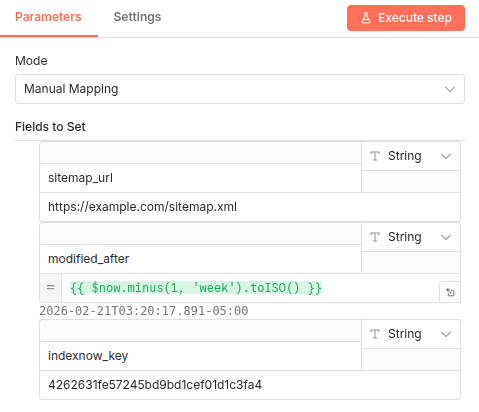
Next, the Read Sitemap (HTTP Request) node pulls the XML data. Because sitemaps are typically XML, we use the Parse XML node to convert that data into a JSON format n8n can easily manipulate.
2. Identifying “Last Modified” Pages
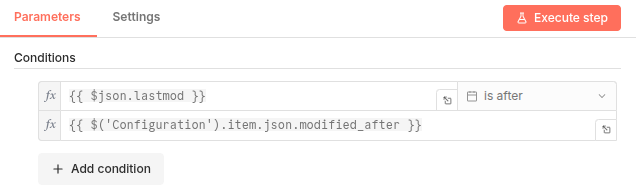
The “brain” of this workflow lies in the Filter node. We don’t want to spam search engines with every single URL every day.
We use a simple JavaScript expression to check if the <lastmod> date is within our desired window by comparing it against the modified_after variable set in our configuration. This ensures we only process pages updated within the last 1 week.
3. Batching for IndexNow
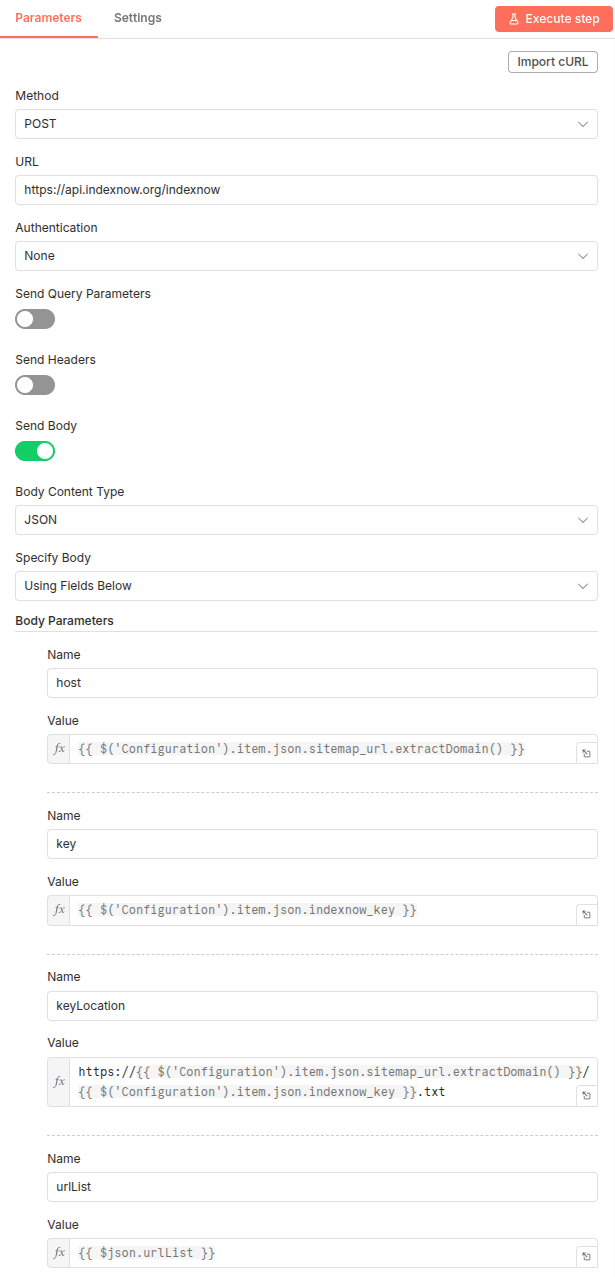
IndexNow allows you to submit URLs individually or in batches. To be efficient, our workflow uses an Aggregate node to gather all filtered URLs into a single JSON array. This is then sent via a POST request to the IndexNow endpoint.
Why This Matters for Your SEO
- Speed: New content is indexed in minutes, not days.
- Accuracy: Search engines always show the most recent version of your pages.
- Efficiency: You reduce server load by telling bots exactly where to go.
Get the Template
Ready to boost your indexing speed? You can check out the full n8n template and import it into your instance using the link below.
Pro Tip: Before running the workflow, ensure you have generated your IndexNow API Key and hosted it as a .txt file in your website’s root directory (e.g., yoursite.com/your-key.txt). This allows search engines to verify that you actually own the domain you are submitting URLs for. Without this file, your API requests will be rejected.