

Introduction: Why Traditional Indexing is Broken
Manual submission of URLs via Google Search Console is a tedious, repetitive task. While many SEOs rely on the Google Indexing API, sending every single URL from your sitemap daily is inefficient and risks hitting API quotas.
This playbook introduces a Smart Indexing Workflow. Instead of “spray and pray,” we use a data-driven approach: we only process pages updated in the last week and verify their status via the URL Inspection API before taking action.
Note: Based on real-world testing, using this API does not guarantee an “instant” visit from Googlebot, but it ensures your most important updates are prioritized in the crawl queue.
Prerequisites & External Services
To run this workflow, you will need to set up the following in the Google Cloud Console:
- APIs Enabled: Activate both the Google Search Console API and the Web Search Indexing API.
- Service Account: Create a Service Account and download the JSON Key.
- Search Console Verification: Add the Service Account’s email address as an Owner or Full Access User in your Google Search Console settings.
Setting Up Credentials in n8n
- Open n8n and go to Credentials.
- Select Google Service Account API.
- Paste Service Account Email and Private Key from your JSON Key file into the credential fields.
- Save it with a name like
Google SEO Service Account.
Workflow Breakdown: Step-by-Step
Step 1: The Configuration & Trigger
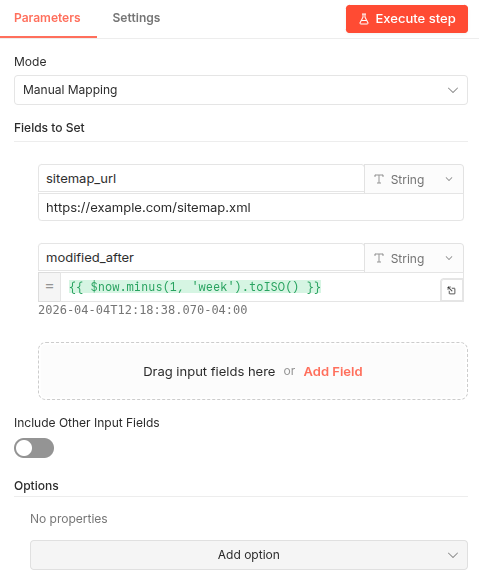
The workflow starts with a Schedule Trigger (set to run daily) and a Set Node labeled Configuration. Here, you define your sitemap_url and a dynamic modified_after date using the expression:
{{ $now.minus(1, 'week').toISO() }}
Step 2: Sitemap Processing
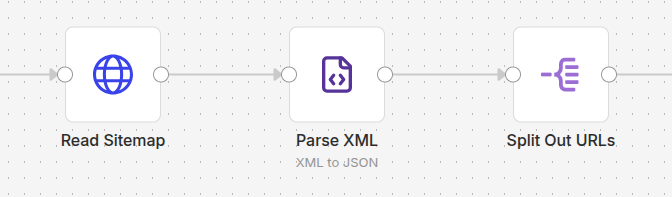
The workflow fetches your XML sitemap and parses it into a list of URLs.
- Read Sitemap: An HTTP Request node.
- Parse XML: Converts the XML structure into JSON objects.
- Split Out URLs: Flattens the list so each URL is processed individually.
Step 3: The “Last Modified” Filter
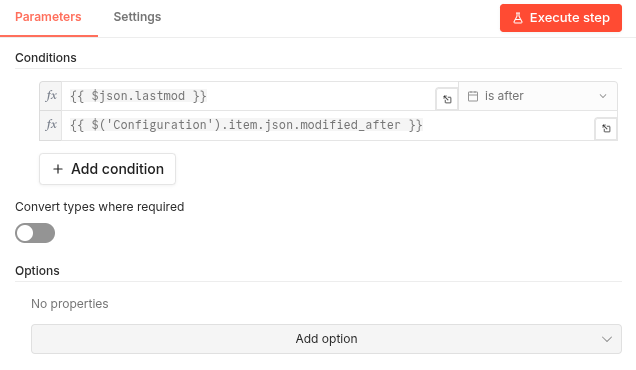
To save API credits, we use a Filter Node that compares the <lastmod> tag from your sitemap against our modified_after variable. Only pages changed in the last 7 days proceed.
Step 4: Real-Time Status Inspection
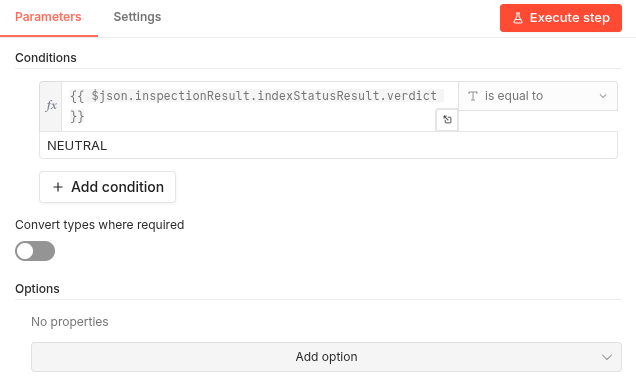
We call the urlInspection:inspect endpoint. This tells us exactly what Google thinks of the page right now. We then use a Filter Node to catch URLs with a NEUTRAL verdict—meaning Google knows about them, but they aren’t currently serving or are pending.
Step 5: Publishing to Indexing API
Finally, the Publish URLs node sends a POST request to the Google Indexing API. This notifies Google that these specific, recently changed, and non-indexed pages need attention.

Conclusion & Best Practices
Key Takeaways
- Efficiency: You only use your API quotas for pages that actually need an update.
- Automation: Once set up, your new content is automatically flagged for Google without manual intervention.
Recommendations for Improvement
- Handling Sitemap Indexes: If your site uses a Sitemap Index (a sitemap containing links to other sitemaps), you will need to add a recursive HTTP loop to fetch the nested URLs.
- Logging: Connect a Google Sheets or Slack node at the end of the workflow to get a daily report of which URLs were submitted.
You can download the ready-to-use workflow template below to import it directly into your n8n instance:
- GitHub Repository: smart-google-indexing