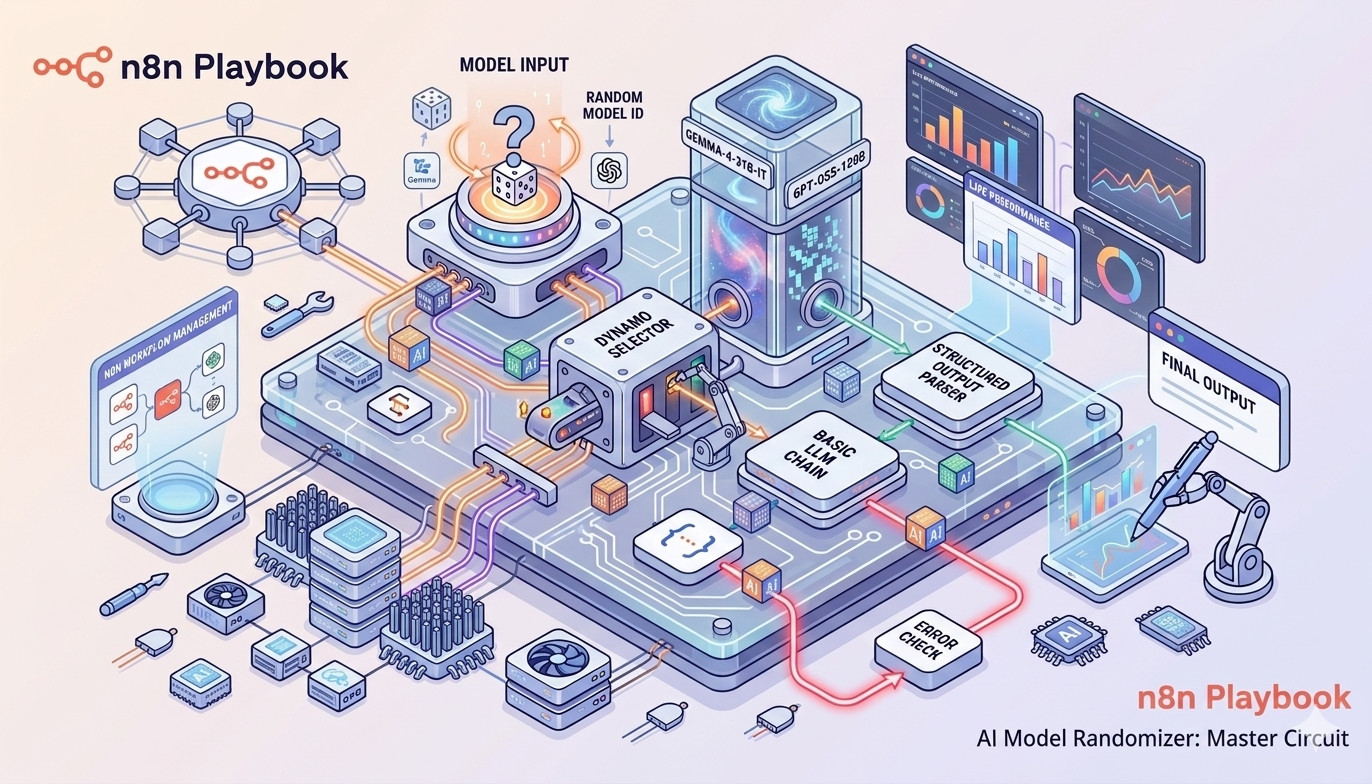
If you are running automated content generation—like crafting hundreds of SEO titles and descriptions—you might have noticed that using a single AI model can make your text feel repetitive. Different models have different “personalities.” For instance, Google’s Gemma might be highly descriptive, while Groq’s Llama or GPT-OSS models are lightning-fast and structurally strict.
So, what if we could randomly distribute our prompts across multiple models to maximize the variety of our results?
In this post, we’ll explore how to achieve this using the Model Selector node in n8n. We’ll walk through our experimental journey, starting from a basic “black box” setup to a fully controlled, trackable, and fault-tolerant architecture.
The Goal: Random Model Selection
Our objective is simple: pass a keyword into an n8n workflow and have it generate an SEO Title and Meta Description in a structured JSON format. However, for every execution, we want n8n to randomly pick either a Google Gemini model or a Groq model to do the heavy lifting for this single task.
Let’s look at the three iterations we went through to get this right.
Case 1: The “Black Box” Approach
The most intuitive way to randomize model selection is to utilize the expression engine directly inside the Model Selector node’s rules.
How we built it:
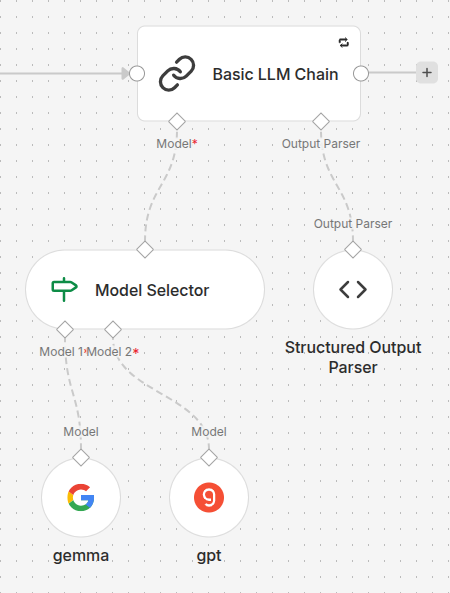
- We set up a Basic LLM Chain node.
- We attached a Structured Output Parser to force the output into a neat JSON object with
reasoning,title, anddescriptionfields. - We connected a Model Selector to the model input, inside which we placed two sub-nodes:
Google Gemini(index 1) andGroq(index 2). - In the Model Selector rules, we used the expression
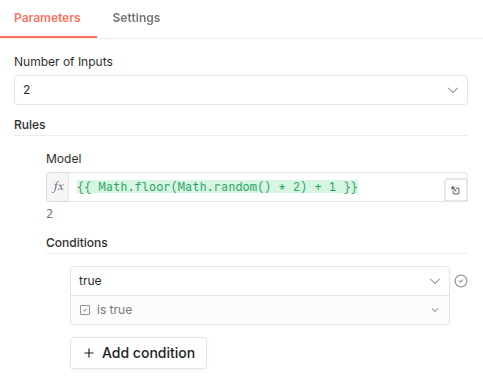
{{ Math.floor(Math.random() * 2) }}to dynamically switch between the two inputs. - We enabled the “Retry On Fail” setting in the Basic LLM Chain (with a 5000ms delay) to ensure resilience against API rate limits.
The Result & Its Flaws
This worked beautifully. When an API failed, the internal retry triggered, re-calculated the random expression, and potentially switched to the other model to save the execution.
The Flaw: We created a black box. Because the randomization happened inside the selector, we had absolutely no idea which model generated the final text. We had variety, but zero observability.
Case 2: The Quest for Attribution
To solve the tracking issue, we needed a way to log the name of the winning model. We tried two approaches here.
Attempt A: Digging for Metadata (Failed)
Our first instinct was to pull the used model from the output data of the Basic LLM Chain or the Model Selector itself. Unfortunately, n8n’s LangChain nodes currently do not expose the identity of the sub-node that processed the request in their standard output JSON.
Attempt B: The .isExecuted Property (Partially Successful)
Next, we tried a clever n8n trick. In a Set node placed after the LLM Chain, we used an expression to check which sub-node actually fired:
{{ $('gemma').isExecuted ? 'gemma-4-31b-it' : $('gpt').isExecuted ? 'gpt-oss-120b' : 'unknown' }}
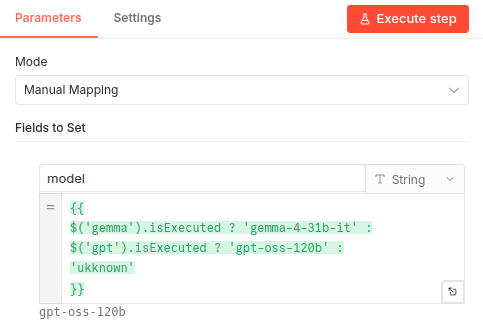
The Fatal Flaw (The Retry Problem): While this worked perfectly for seamless runs, it completely broke when errors occurred. If the Gemma API timed out on the first try, its .isExecuted state still became true. If the internal retry mechanism then successfully utilized the Groq model on the second try, our expression would check Gemma first, see true, and log the wrong model!
Case 3: The Master Circuit (The Ultimate Solution)
To achieve perfect tracking and fault tolerance, we realized we had to stop relying on hidden internal states. We needed to extract both the randomization and the retry logic outside of the AI nodes.
The New Architecture:
- The External State (
Setnode): Before the LLM Chain, we added a node named “Model Input”. This node generates the random model index (1or2) and attaches it directly to the flow’s JSON data. It also initializes anattemptcounter. - Explicit Routing: The Model Selector no longer generates the random number. It simply reads
{{ $json.model }}from the incoming data to select the model for the task. - Disabling Internal Retries: We turned off “Retry On Fail” in the Basic LLM Chain. Instead, in the node settings, we set On Error to “Continue (using error output)”.
- The Retry Logic (
Ifnode): We connected anIfnode specifically to the second (error) output of the LLM chain. If the chain fails, this node checks if theattemptcount is still within our allowed limit. If so, it routes the flow back to the “Model Input” node to roll a new model and try again.
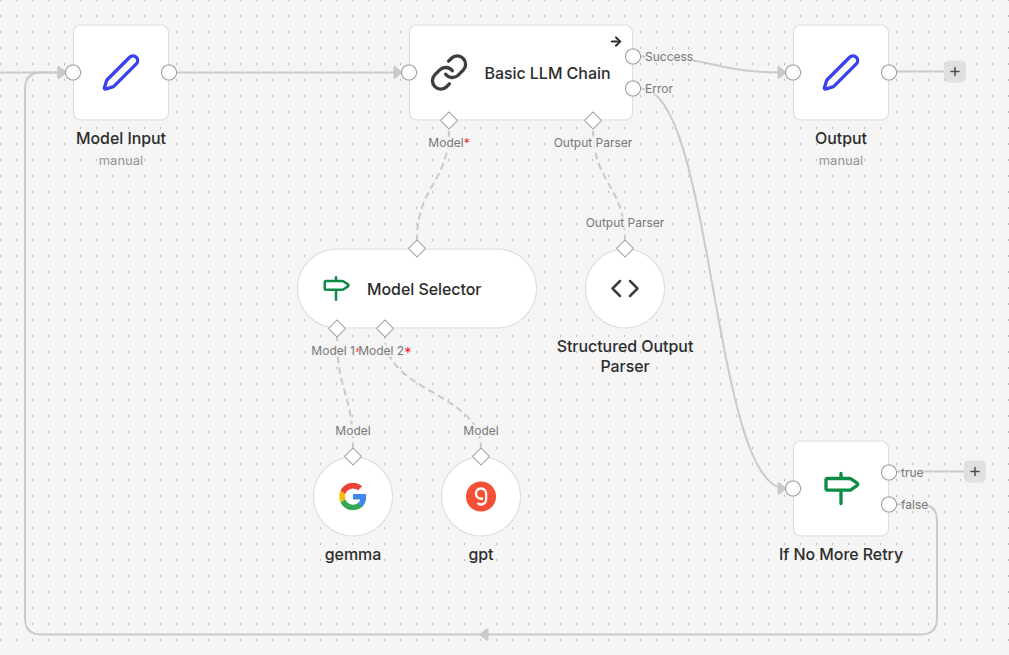
Configuration Details
To make this work, we need to carefully set up our input and output nodes.
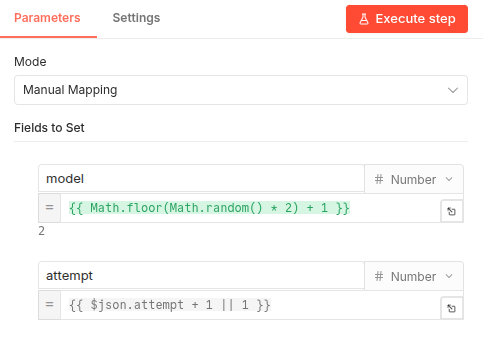
The Model Input Node: This node is responsible for picking the model index and incrementing the attempt count. It ensures that the state is passed forward to the AI nodes.
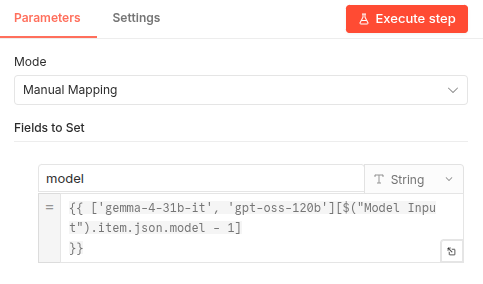
The Final Output Node: Since the model index is now part of our data stream, identifying the source is as simple as mapping that index to a human-readable name.
Why This is the Best Approach
- Perfect Attribution: Because the chosen model index is hardcoded into the item’s JSON before the API call, we can effortlessly map it to the model’s name in the final output block.
- Resilience: We still have retries, but we control them.
- Complete Observability: We can see exactly how many attempts it took, which model failed, and which one succeeded for that specific task.
Conclusion
By moving the control logic outside of the specialized AI nodes, we transformed an opaque process into a transparent, professional-grade automation engine. This “Master Circuit” approach highlights the true power of n8n: its ability to combine advanced AI capabilities with robust, standard workflow logic. Whether you’re running n8n in the cloud or on a local high-performance server, this setup ensures you get the creative variety of multiple LLMs without sacrificing analytics, tracking, or stability.
Ready to implement this in your own project? You can download the complete workflow templates below:
- GitHub - Download the
.jsontemplate.